Building an API That Says No
Most API tutorials teach the happy path where you send a request and get your data back. That is the smaller half of the job. The half that matters is what happens when a request is wrong, or bad, or just weird, because over a long enough period of time that is the most of the requests your server will ever see.

I built a small CRUD API this month using Express on top of MongoDB with a React front end talking to it. The data is a “Student Roster” with a list of students and their respective class (just one). Nothing too clever, but somewhere between “it works on my machine” and “it’s on the internet” an API becomes a door with your name on it. This post is about one small part of that door: the status code.
why you might care about this
APIs are everywhere. Phones, apps, smart devices, even the site you are reading this on! They are also where the industry keeps getting hit. Pow.
There’s a nonprofit called the Open Worldwide Application Security Project (OWASP). Their purpose is to make the knowledge of application security free and public. Their API Security Top 10 is a project where they give people the top ten vulnerabilities for APIs and how to fix them. Example, number one on their list is Broken Object Level Authorization, which they describe as APIs exposing endpoints that handle object identifiers. Basically the server checks if you’re logged in but it never checks if the thing you asked for is actually yours so changing a character in the request URL gives you someone else’s record. Wack.
Nearly everything on that list is an API being too agreeable. So the goal is building one that refuses correctly, even if it’s not super fancy.
if you want to follow along
The “try it yourself” below works against your own API. If you don’t have one, this is a whole one. It has no database, it forgets everything when you close it, and it gets the refusals right (woohoo!) which is the important thing.
mkdir api-demo && cd api-demo
npm init -y
npm install express
Create a file called server.js and put this in it:
const express = require("express");
const app = express();
app.use(express.json());

const students = [];
let nextId = 1;

app.get("/students", (req, res) => res.json(students));

app.get("/students/:id", (req, res) => {
  if (!/^\d+$/.test(req.params.id)) {
    return res.status(400).json({ message: "Invalid student ID" });
  }
  const student = students.find((s) => s.id === Number(req.params.id));
  if (!student) {
    return res.status(404).json({ message: "Student not found" });
  }
  res.json(student);
});

app.post("/students", (req, res) => {
  const { name, class: klass } = req.body || {};
  if (!name || !klass) {
    return res.status(400).json({ message: "name and class are required" });
  }
  const student = { id: nextId++, name, class: klass };
  students.push(student);
  res.status(201).json(student);
});

app.listen(8080, () => console.log("listening on http://localhost:8080"));
Then run node server.js and leave it going in its own terminal. You’ll need a second terminal for the next part.
If you get EADDRINUSE, something else on your machine already has port 8080. Change that last line to any free port and use the same one in the commands below. On a Mac, 5000 and 7000 are taken by AirPlay, so don’t reach for those.
Public sandbox APIs won’t work for this, because JSONPlaceholder fakes every write and reports success, so it can never show you a 400. An API that refuses nothing can’t teach you anything about refusals, amaright?
status codes are a contract
Status codes are specified in RFC 9110 and they mean specific things. 201 means you created something. 400 means the client sent garbage. 404 means the request was fine but the thing is not here. 500 means you broke it on your end. MDN keeps a readable version if the RFC is heavy going.
This matters because the code is the only part of your response some clients will ever read. A front end that gets a 200 with an error message buried in the body has no way to know anything went wrong.
The distinction that took me longest was that a bad ID and a valid ID that doesn’t match anything are two different failures. banana is not an ID at all, so that’s a bad request (400). An ID that’s shaped right but doesn’t match any student is a fine question with a negative answer (404). Your demo server already tells them apart, which is what the regex check and the find are doing in two separate steps.
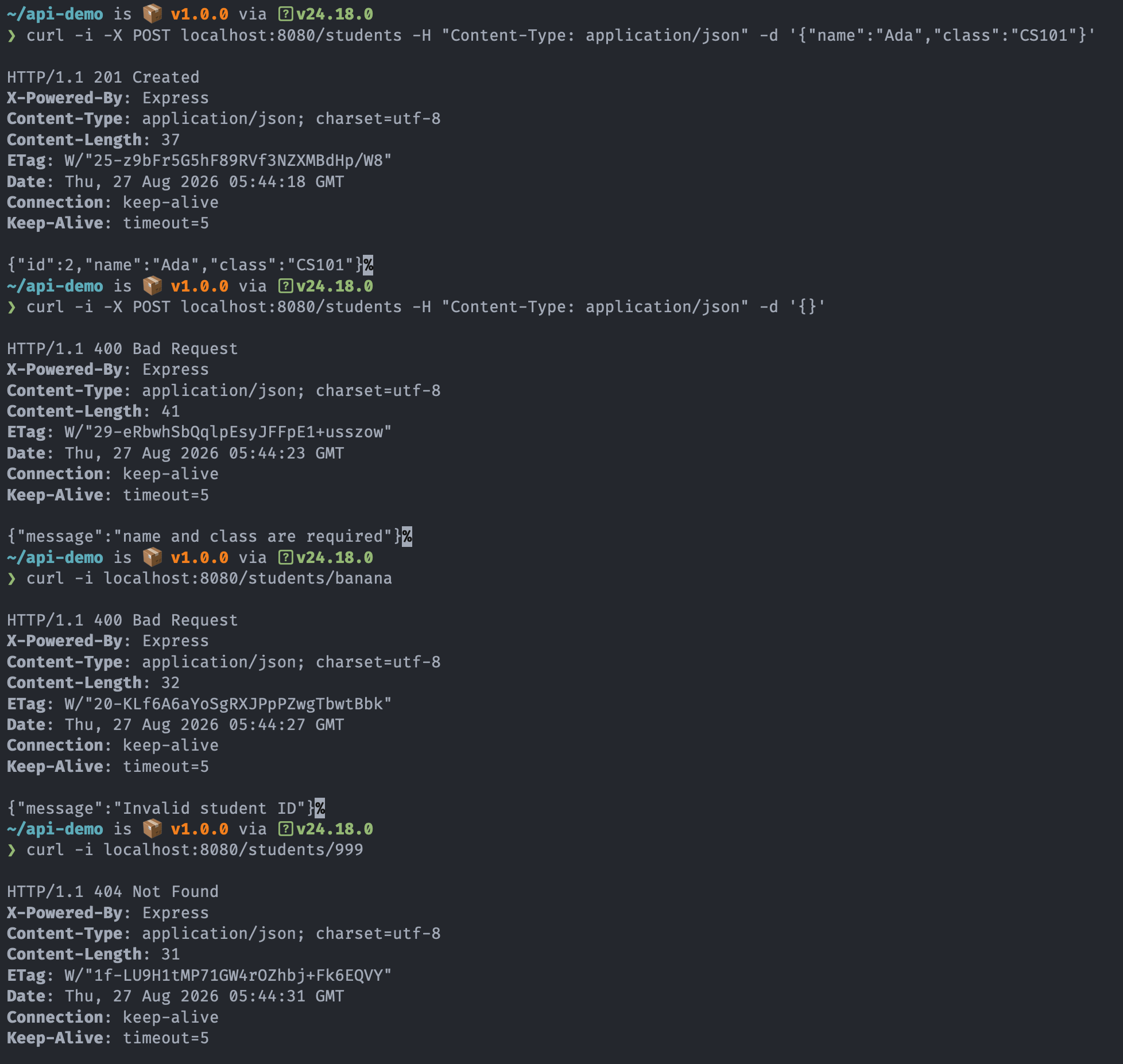
Try it yourself. In your second terminal, hit the API with curl -i, which prints the status line. One good request, one broken one, one bad ID, one that is structured properly but doesn’t exist:
curl -i -X POST localhost:8080/students -H "Content-Type: application/json" -d '{"name":"Ada","class":"CS101"}'
curl -i -X POST localhost:8080/students -H "Content-Type: application/json" -d '{}'
curl -i localhost:8080/students/banana
curl -i localhost:8080/students/999
You want 201, 400, 400, 404. Four requests and no 500, because 500 means your server took the blame for the client’s mistake. Each is a small refusal, and none of it needed a framework change or a rewrite.